FiturFeatures

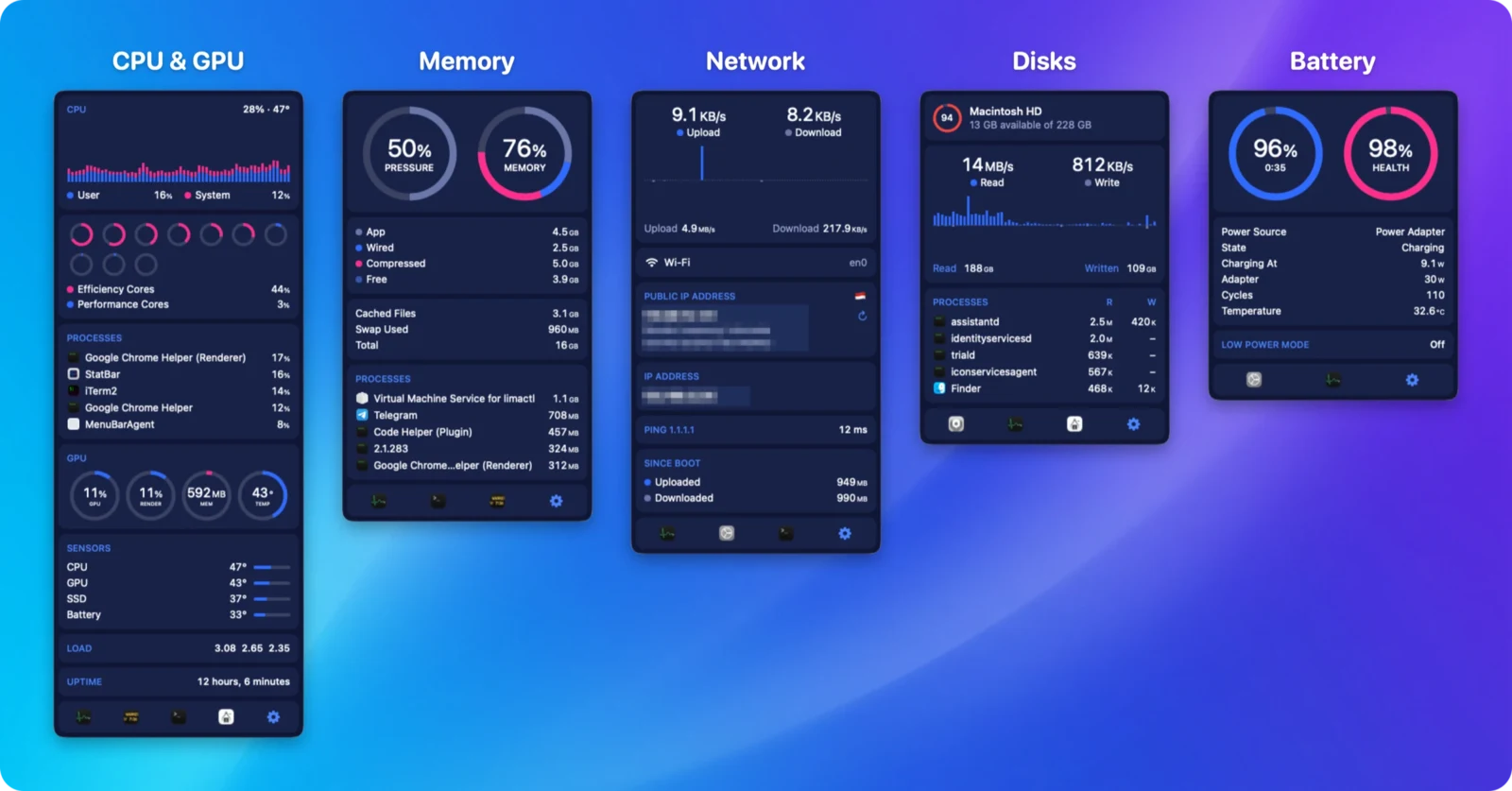
CPU & GPU dalam satu dropdownCPU & GPU in one dropdown

Riwayat pemakaian user + system, cincin tiap core sesuai klaster efficiency/performance, proses teratas, dan gauge GPU/render/memori/suhu.User + system usage history, a ring per core coloured by efficiency/performance cluster, top processes, and GPU/render/memory/temperature gauges.

Memori sekali lihatMemory at a glance

Cincin pressure dan memori, rincian app/wired/compressed/free, cached files, swap, dan proses teratas.Pressure and memory rings, the app/wired/compressed/free breakdown, cached files, swap, and top processes.

Jaringan lengkap dengan IP publikNetwork, public IP included

Riwayat upload/download dengan puncaknya, IP publik beserta negara dan lokasi, IP lokal, ping, dan total sejak boot.Upload/download history with peaks, your public IP with country and location, local IP, ping, and totals since boot.

Semua disk dan siapa yang memakainyaEvery disk, and who's using it

Tiap volume dengan sisa ruangnya, riwayat baca/tulis, dan proses teratas berdasarkan I/O disk.Every volume with its free space, read/write history, and top processes by disk I/O.

Baterai, bukan cuma persentaseBattery, beyond the percentage

Sisa waktu, kesehatan baterai, daya yang ditarik, watt adaptor, jumlah siklus, suhu, dan Low Power Mode.Time remaining, battery health, power draw, adapter wattage, cycle count, temperature, and Low Power Mode.

Cara memasangHow to install

Homebrew adalah cara termudah — satu perintah, tidak ada langkah lain:

Homebrew is the easiest way — one command, nothing else to set up:

brew install --cask ahmadarif-lab/tap/statbar

Perintah ini menambahkan tap ahmadarif-lab/tap dan langsung membersihkan flag karantina, jadi aplikasi terbuka tanpa peringatan Gatekeeper. Lalu buka StatBar dari Applications.

This adds the ahmadarif-lab/tap tap and clears the quarantine flag, so the app opens straight away — no Gatekeeper warning to click through. Then open StatBar from Applications.

  1. Buka StatBar dari Applications. Tiap item (CPU & GPU, Memory, Network, Disks, Battery) langsung tampil berdampingan dalam satu grup di menu bar; atur mana yang ditampilkan dan urutannya lewat Settings.
  2. Lewat DMG: unduh berkas di atas, buka, lalu seret StatBar ke Applications.
  3. StatBar ditandatangani ad-hoc, bukan dengan Developer ID dan dinotarisasi, jadi macOS memblokir pemasangan pertama dari DMG. Bersihkan sekali lewat Terminal: xattr -dr com.apple.quarantine /Applications/StatBar.app, atau buka lewat System Settings → Privacy & Security → Open Anyway.
  4. Untuk memperbarui: instalasi Homebrew tinggal brew upgrade --cask statbar, atau klik pembaruan yang ditawarkan aplikasi sendiri. Instalasi manual dari DMG akan diarahkan ke halaman rilis GitHub.
  1. Open StatBar from Applications. Every item (CPU & GPU, Memory, Network, Disks, Battery) shows up side by side in one menu bar group right away; choose which ones to show and their order from Settings.
  2. Via DMG: download the file above, open it, then drag StatBar into Applications.
  3. StatBar is ad-hoc signed rather than signed with a Developer ID and notarized, so macOS blocks the first launch from a DMG. Clear it once from Terminal: xattr -dr com.apple.quarantine /Applications/StatBar.app, or open it once through System Settings → Privacy & Security → Open Anyway.
  4. To update: a Homebrew install is just brew upgrade --cask statbar, or click the update prompt the app offers on its own. A manual DMG install opens the GitHub release page instead.

PrivasiPrivacy

Semua angka dibaca langsung dari macOS di perangkatmu — StatBar tidak menjalankan server dan tidak mengirim datamu ke mana pun milik kami. Tidak ada helper tool, tidak butuh akses root, dan tidak ada akun untuk didaftarkan.

Every number is read directly from macOS on your device — StatBar runs no server and sends none of your data anywhere we control. No helper tool, no root access, and no account to sign up for.

Satu-satunya data yang keluar dari perangkatmu adalah alamat IP publik, dicari lewat ipinfo.io (beserta negara dan kotanya) saat opsi itu aktif — aktif secara default, bisa dimatikan di Settings → Network.

The only data that leaves your device is your public IP address, looked up from ipinfo.io (along with its country and city) when that option is on — it is on by default, and can be switched off under Settings → Network.

Pemeriksaan pembaruan menanyakan GitHub Releases API repo ini, hanya saat Automatically check for updates aktif atau saat kamu mengklik Check for Updates, tanpa mengirim datamu. Tanpa iklan, tanpa analitik pihak ketiga.

The update check asks this repo's GitHub Releases API, only while Automatically check for updates is on or when you click Check for Updates, without sending your data. No ads, no third-party analytics.

Suhu dan kipas dibaca lewat kunci SMC yang tidak didokumentasikan resmi oleh Apple; StatBar hanya membacanya, tidak pernah menulis. Proses milik root tidak ikut ditampilkan di daftar proses teratas karena StatBar sengaja tidak memasang helper tool berhak akses tinggi.

Temperatures and fans are read from undocumented SMC keys that Apple hasn't officially published; StatBar only reads them, never writes. Processes owned by root are left out of the top-process lists because StatBar deliberately doesn't install a privileged helper tool.

Kebijakan PrivasiPrivacy Policy · Syarat & KetentuanTerms of Service

Catatan: StatBar adalah proyek independen dan tidak berafiliasi dengan iStat Menus maupun Bjango.

Note: StatBar is an independent project and is not affiliated with iStat Menus or Bjango.

Riwayat versiVersion history

Versi lama tetap bisa diunduh. Untuk memastikan berkas tidak berubah, cocokkan SHA-256-nya dengan shasum -a 256 namaberkas.Older versions stay available. To verify a file is unchanged, compare its SHA-256 with shasum -a 256 filename.

v0.1.3

30 September 2026September 30, 2026 TerbaruLatest
  • Settings → General → Menu Bar punya saklar baru Keep items together, menyala secara default. Kalau menyala, semua item tampil berdampingan dalam satu item menu bar seperti di 0.1.2. Kalau dimatikan, tiap item kembali punya item menu bar sendiri yang bisa ditempatkan terpisah.
  • Settings → General → Menu Bar gains Keep items together, on by default. On, every readout sits side by side in one menu bar item, as in 0.1.2. Off, each readout gets its own menu bar item again, which you can place on its own.
StatBar.dmg · universal · 2,5 MB2.5 MB
SHA-25671bcd9570587396bd3af76d702e138b0ef1aa54b882b5f5a390791ad4570ce82

v0.1.2

30 September 2026September 30, 2026
  • Semua item (CPU & GPU, Memory, Network, Disks, Battery) kini digambar berdampingan dalam satu item menu bar, sesuai urutan di Settings. Ikon menu bar aplikasi lain tidak bisa lagi terselip di antaranya. Klik sebuah item tetap membuka dropdown-nya sendiri, tepat di bawahnya.
  • Item padding kini mengatur jarak antar item.
  • Every readout (CPU & GPU, Memory, Network, Disks, Battery) is now drawn side by side in a single menu bar item, in the order set in Settings. Other apps' menu bar icons can no longer end up between them. Clicking a readout still opens its own dropdown, right below it.
  • Item padding now sets the gap between readouts.
StatBar.dmg · universal · 2,5 MB2.5 MB
SHA-256812e2047d0f4178eaf09f5692493de5639e76b02645acefffe4d6d4f072f7d3a

v0.1.1

28 September 2026September 28, 2026
  • Angka jaringan di menu bar kini dibulatkan tanpa desimal begitu mencapai 100 ke atas (mis. "123 KB/s", bukan "123.5 KB/s"), dan kolom angkanya dipersempit mengikuti — supaya item network tidak melebarkan menu bar. Di bawah 100 tetap tampil satu desimal.
  • Network rates in the menu bar now round to a whole number once they hit 100 or more (e.g. "123 KB/s" instead of "123.5 KB/s"), and the number column is narrower to match — keeping the network item from stretching the menu bar. Rates under 100 still show one decimal.
StatBar.dmg · universal · 2,5 MB2.5 MB
SHA-2564e8b46d43bc8d2b2d91867afc8b306af3d11adf48c7b3cb84975b5c190f12db5

v0.1.0

28 September 2026September 28, 2026
  • Rilis pertama StatBar, monitor sistem menu bar macOS native ala iStat Menus.
  • CPU & GPU, Memory, Network, Disks, dan Battery — masing-masing dengan item menu bar dan dropdown sendiri.
  • Tema untuk dropdown, urutan item menu bar bisa diseret, interval update per item, serta ekspor/impor pengaturan.
  • First release of StatBar, a native macOS menu bar system monitor in the spirit of iStat Menus.
  • CPU & GPU, Memory, Network, Disks and Battery — each with its own menu bar item and dropdown.
  • Themes for the dropdowns, drag-to-reorder menu bar items, per-item update intervals, and settings export/import.
StatBar.dmg · universal · 3,0 MB3.0 MB
SHA-25623c7a0a16459a60e0fcb4d21e3e28d128fc596fd97fe4056141698b331672c5f