
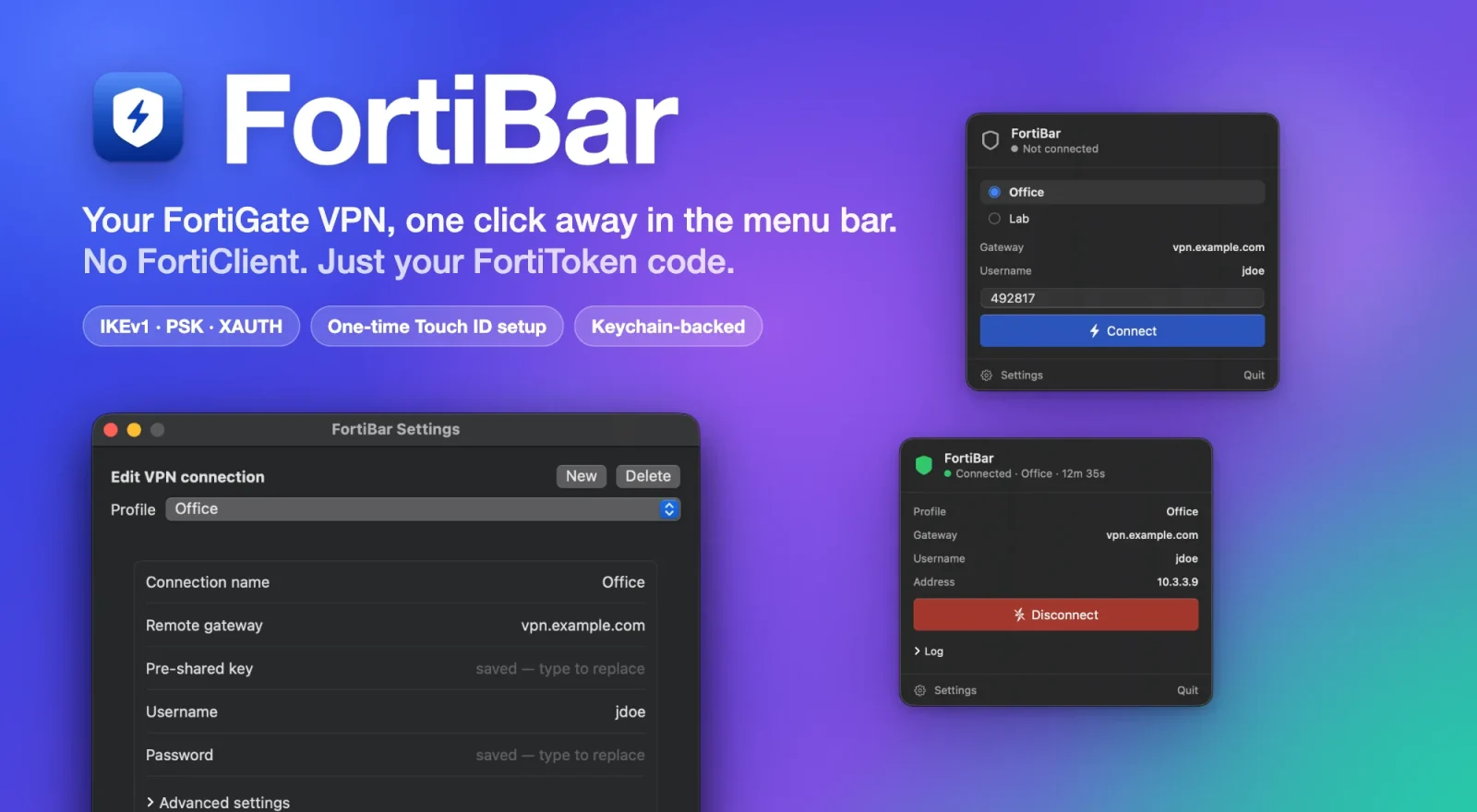
FiturFeatures

Tanpa FortiClientNo FortiClient

FortiBar berbicara langsung dengan gateway FortiGate lewat strongSwan, jadi FortiClient tidak perlu dipasang sama sekali. Mendukung IKEv1 aggressive mode dengan kunci pra-bagi dan XAUTH, dengan atau tanpa FortiToken.FortiBar talks to the FortiGate gateway itself through strongSwan, so FortiClient doesn't need to be installed at all. It supports IKEv1 aggressive mode with a pre-shared key and XAUTH, with or without FortiToken.

Cukup kode FortiTokenJust the FortiToken code

Helper kecil di latar belakang dipasang sekali dengan satu persetujuan administrator (Touch ID). Setelah itu tidak ada lagi prompt password, Touch ID, atau sudo tiap kali konek — buka menu, ketik kodenya, Connect.A small background helper is installed once with a single administrator approval (Touch ID). After that there is no password prompt, no Touch ID and no sudo on each connect — open the menu, type the code, Connect.

Beberapa profil, kredensial di KeychainSeveral profiles, credentials in the Keychain

Kunci pra-bagi dan password tiap profil tersimpan di Keychain macOS dan bisa diubah kapan saja dari Settings. Kode FortiToken tidak pernah disimpan. Satu terowongan aktif pada satu waktu.Each profile's pre-shared key and password live in the macOS Keychain and can be edited any time from Settings. The FortiToken code is never stored. One tunnel is active at a time.

Split tunnel yang rapiTidy split tunnelling

Hanya subnet yang kamu tentukan (bawaan: 10.0.0.0/8, 172.16.0.0/12, 192.168.0.0/16) yang lewat VPN, dan rentang LAN tertentu bisa dipaksa tetap lokal. Internet biasa tidak tersentuh.Only the subnets you list (default 10.0.0.0/8, 172.16.0.0/12, 192.168.0.0/16) go through the VPN, and specific LAN ranges can be pinned to stay local. Your normal internet traffic is untouched.

Membereskan dirinya sendiriCleans up after itself

Kalau terowongan putus, route dan daemon VPN dibersihkan otomatis sehingga Mac tidak tertinggal dalam keadaan setengah terkonfigurasi. Ada notifikasi saat tersambung dan terputus.If the tunnel drops, its routes and the VPN daemon are cleaned up automatically so the Mac is never left half-configured. You get a notification when it connects and disconnects.

Cara memasangHow to install

Homebrew adalah cara termudah — satu perintah, tidak ada langkah lain:

Homebrew is the easiest way — one command, nothing else to set up:

brew install --cask ahmadarif-lab/tap/fortibar

Perintah ini menambahkan tap ahmadarif-lab/tap dan langsung membersihkan flag karantina, jadi aplikasi terbuka tanpa peringatan Gatekeeper. Lalu buka FortiBar dari Applications.

This adds the ahmadarif-lab/tap tap and clears the quarantine flag, so the app opens straight away — no Gatekeeper warning to click through. Then open FortiBar from Applications.

  1. Buka FortiBar dari Applications, lalu Settings: isi profil (gateway, kunci pra-bagi, username, password), klik Install helper dan setujui sekali dengan Touch ID. Instalasi manual dari DMG juga butuh brew install strongswan; lewat Homebrew sudah otomatis. Setelah itu cukup ketik kode FortiToken dan Connect.
  2. Lewat DMG: unduh berkas di atas, buka, lalu seret FortiBar ke Applications.
  3. FortiBar ditandatangani ad-hoc, bukan dengan Developer ID dan dinotarisasi, jadi macOS memblokir pemasangan pertama dari DMG. Bersihkan sekali lewat Terminal: xattr -dr com.apple.quarantine /Applications/FortiBar.app, atau buka lewat System Settings → Privacy & Security → Open Anyway.
  4. Untuk memperbarui: instalasi Homebrew tinggal brew upgrade --cask fortibar, atau klik pembaruan yang ditawarkan aplikasi sendiri. Instalasi manual dari DMG akan diarahkan ke halaman rilis GitHub.
  1. Open FortiBar from Applications, then Settings: fill in the profile (gateway, pre-shared key, username, password), click Install helper and approve it once with Touch ID. A manual DMG install also needs brew install strongswan; Homebrew does that for you. From then on just type the FortiToken code and Connect.
  2. Via DMG: download the file above, open it, then drag FortiBar into Applications.
  3. FortiBar is ad-hoc signed rather than signed with a Developer ID and notarized, so macOS blocks the first launch from a DMG. Clear it once from Terminal: xattr -dr com.apple.quarantine /Applications/FortiBar.app, or open it once through System Settings → Privacy & Security → Open Anyway.
  4. To update: a Homebrew install is just brew upgrade --cask fortibar, or click the update prompt the app offers on its own. A manual DMG install opens the GitHub release page instead.

PrivasiPrivacy

FortiBar tidak punya server dan tidak mengirim data apa pun kepada kami. Lalu lintas jaringan yang dibuatnya hanya koneksi IPsec ke gateway FortiGate yang kamu isi sendiri dan pemeriksaan pembaruan ke GitHub Releases API repo ini (bisa dimatikan di Settings), tanpa mengirim datamu. Saat kamu mengklik Install pada pembaruan, aplikasi menjalankan Homebrew di perangkatmu untuk mengunduhnya. Tanpa akun, tanpa iklan, dan tanpa analitik.

FortiBar runs no server and sends no data to us. The only network traffic it creates is the IPsec connection to the FortiGate gateway you entered yourself and an update check against this repo's GitHub Releases API (which you can turn off in Settings), without sending your data. When you click Install on an update, the app runs Homebrew on your device to download it. No account, no ads, and no analytics.

Kunci pra-bagi dan password disimpan di Keychain macOS milik akunmu; kode FortiToken tidak pernah disimpan. Saat konek, rahasia dikirim ke helper lewat soket lokal dan dimuat ke strongSwan tanpa ditulis ke disk, lalu rahasia XAUTH dilepas begitu handshake selesai.

The pre-shared key and password are stored in your own macOS Keychain; the FortiToken code is never stored. When connecting, secrets go to the helper over a local socket and are loaded into strongSwan without being written to disk, and the XAUTH secret is dropped as soon as the handshake finishes.

Helper (LaunchDaemon) berjalan sebagai root dan dipasang sekali dengan persetujuan administrator. Soketnya hanya bisa dipakai akunmu, hanya menerima perintah status, konek, dan putus dengan parameter yang divalidasi, dan tidak pernah menjalankan perintah dari pihak luar.

The helper (a LaunchDaemon) runs as root and is installed once with administrator approval. Its socket is usable only by your account, it accepts only status, connect and disconnect with validated parameters, and it never runs commands supplied by a caller.

Kebijakan PrivasiPrivacy Policy · Syarat & KetentuanTerms of Service

Catatan: FortiBar adalah proyek independen dan tidak berafiliasi dengan Fortinet, Inc. FortiGate, FortiClient, dan FortiToken adalah merek dagang Fortinet, Inc.

Note: FortiBar is an independent project and is not affiliated with Fortinet, Inc. FortiGate, FortiClient and FortiToken are trademarks of Fortinet, Inc.

Riwayat versiVersion history

Versi lama tetap bisa diunduh. Untuk memastikan berkas tidak berubah, cocokkan SHA-256-nya dengan shasum -a 256 namaberkas.Older versions stay available. To verify a file is unchanged, compare its SHA-256 with shasum -a 256 filename.

v0.3.1

6 Oktober 2026October 6, 2026 TerbaruLatest
  • Pembaruan kini bisa dipasang dari FortiBar sendiri: banner pembaruan dan Settings → General punya tombol Install yang menjalankan upgrade Homebrew lalu membuka ulang FortiBar; koneksi VPN yang aktif tetap hidup. Tidak perlu lagi menyalin perintah ke Terminal.
  • Kalau FortiBar tidak dipasang lewat Homebrew, Install membuka halaman rilis untuk mengunduh FortiBar.dmg.
  • Memperbarui dari 0.3.0 atau lebih lama masih perlu brew upgrade --cask fortibar sekali, karena versi itu belum punya tombol Install. Mulai 0.3.1, pembaruan lewat menu.
  • Install updates from FortiBar itself: the update banner and Settings → General now have an Install button that runs the Homebrew upgrade for you and reopens FortiBar; an active VPN connection stays up. No more copying a command into Terminal.
  • If FortiBar wasn't installed with Homebrew, Install opens the release page so you can download FortiBar.dmg.
  • Updating from 0.3.0 or earlier still needs brew upgrade --cask fortibar once, because those versions don't have the Install button yet. From 0.3.1 on, updates come from the menu.
FortiBar.dmg · universal · 1,3 MB1.3 MB
SHA-25663097dd05cf38b7c7ed3cd0f610a5f10886eeaa0e6bf6b1a9e6f90a8e9aae28f

v0.3.0

6 Oktober 2026October 6, 2026
  • Pengaturan opsional Rute IP virtual lokal (profil → Advanced settings, mati secara default) untuk kamu yang menjalankan proxy lokal seperti sshuttle di atas VPN dan koneksi ke host di balik VPN kena timeout.
  • Setelah tersambung, FortiBar mengarahkan IP virtual tunnel ke lo0 dan menghapus rute itu saat putus; kalau gagal dipasang, muncul peringatan dan tunnel tetap hidup.
  • Protokol helper berubah: setelah memperbarui, buka Settings → System lalu pilih Update helper satu kali (setujui dengan Touch ID).
  • New optional Route virtual IP locally setting (profile → Advanced settings, off by default) for people who run a local proxy such as sshuttle on top of the VPN and see connections to hosts behind the VPN time out.
  • After connecting, FortiBar re-points the tunnel's virtual IP at lo0 and removes that route on disconnect; if it can't be applied, a warning is shown and the tunnel stays up.
  • The helper protocol changed: after updating, open Settings → System and choose Update helper once (approve with Touch ID).
FortiBar.dmg · universal · 1,3 MB1.3 MB
SHA-25608ccf38cc2ea483e5feef84324908b3c93df289c8cca503fbe35d2cd0761a30d

v0.2.0

5 Oktober 2026October 5, 2026
  • Pemberitahuan pembaruan: FortiBar memeriksa rilis terbaru di GitHub saat dibuka dan tiap 12 jam, lalu menampilkan notifikasi dan banner di menu.
  • Pemeriksaan bisa dimatikan atau dijalankan manual di Settings → General.
  • Nomor versi kini tampil di sebelah nama FortiBar di menu.
  • Update notifications: FortiBar checks GitHub for a new release at launch and every 12 hours, then shows a notification and a banner in the menu.
  • The check can be turned off or run by hand under Settings → General.
  • The version number now shows next to the FortiBar name in the menu.
FortiBar.dmg · universal · 1,2 MB1.2 MB
SHA-2563f168bf5d32d9c1ea6d46733bd249cdbb3a8358054647d7b72c956002f4b0c06

v0.1.0

5 Oktober 2026October 5, 2026
  • Rilis pertama FortiBar: VPN IPsec FortiGate (IKEv1, kunci pra-bagi, XAUTH, FortiToken) dari menu bar macOS, tanpa FortiClient.
  • Helper dipasang sekali dengan persetujuan administrator; setelah itu konek hanya butuh kode FortiToken.
  • Beberapa profil dengan kredensial di Keychain, split tunnel yang bisa diatur, dan pembersihan otomatis saat terowongan putus.
  • First release of FortiBar: FortiGate IPsec VPN (IKEv1, pre-shared key, XAUTH, FortiToken) from the macOS menu bar, no FortiClient.
  • The helper is installed once with administrator approval; after that, connecting needs only the FortiToken code.
  • Several profiles with credentials in the Keychain, configurable split tunnelling, and automatic cleanup when the tunnel drops.
FortiBar.dmg · universal · 1,2 MB1.2 MB
SHA-2565dc91be823c6fba2d41b1d8d494f46eb3e89189728e7bba1058a022ef07befc0