FiturFeatures

Satu menu bar, tujuh providerOne menu bar, seven providers

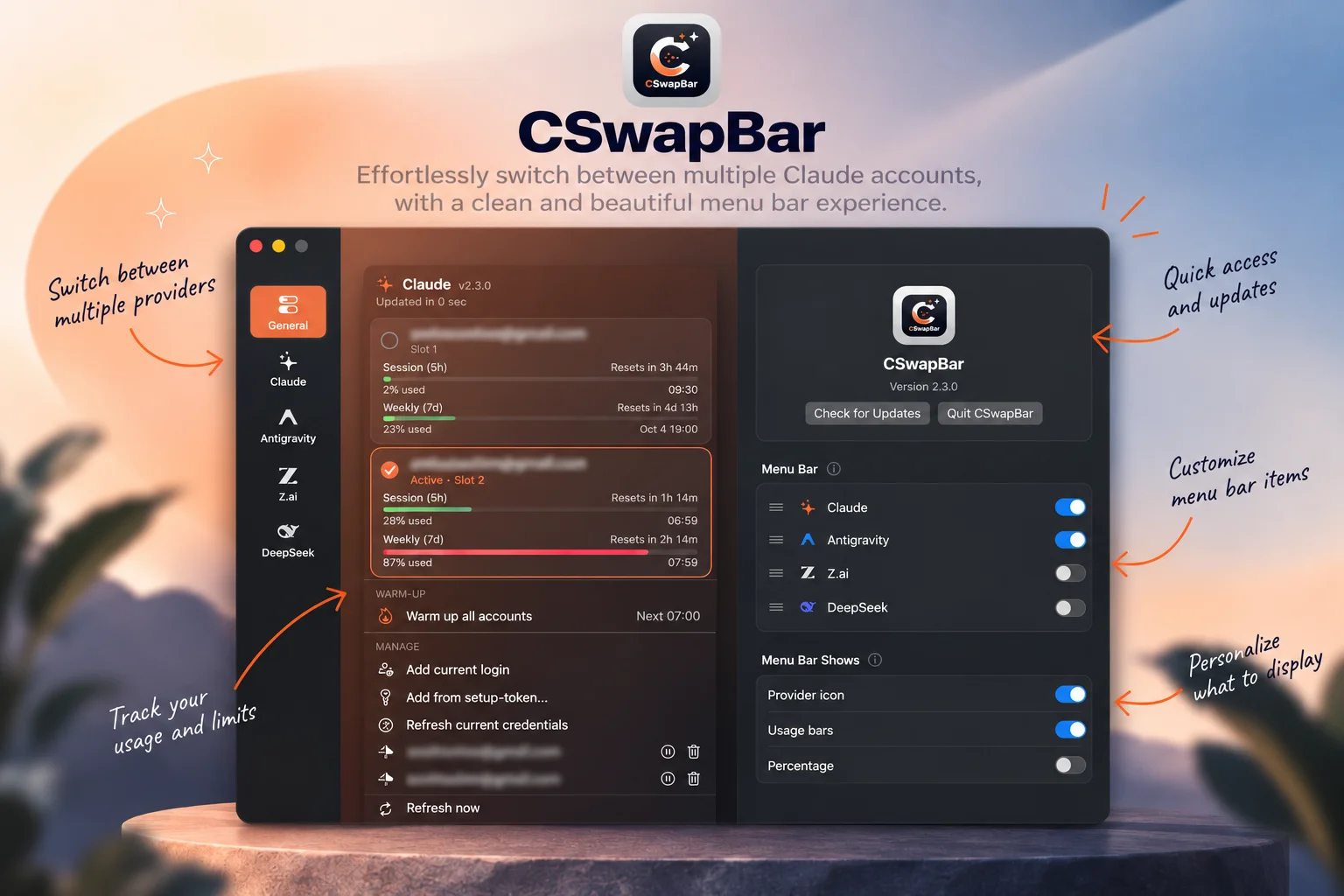
Nyalakan Claude Code, Antigravity, z.ai (GLM Coding Plan), DeepSeek, OpenCode Go, Kiro, dan/atau Codex dari Settings — tiap provider yang aktif tampil berdampingan dalam satu grup di menu bar (atau sebagai item terpisah, kalau kamu mau) dengan dropdown kuotanya sendiri, dan bisa diurutkan bebas. DeepSeek yang pay-as-you-go menampilkan sisa saldo API (paid + granted); OpenCode Go menampilkan kuota langganannya — 5 jam, mingguan, dan bulanan — lengkap dengan nominal yang sudah terpakai di tiap jendela; Kiro menampilkan kumpulan kredit bulanan dari paket yang sedang kamu pakai; Codex menampilkan pemakaian 5 jam dan mingguan dari paket ChatGPT yang sedang kamu pakai.Turn on Claude Code, Antigravity, z.ai (GLM Coding Plan), DeepSeek, OpenCode Go, Kiro, and/or Codex from Settings — each active provider sits side by side in one menu bar group (or as separate items, if you prefer) with its own quota dropdown, reorderable however you like. Pay-as-you-go DeepSeek shows your remaining API credit (paid + granted); OpenCode Go shows its subscription quota — 5-hour, weekly and monthly — with the spend behind each window; Kiro shows the monthly credit pool of the plan you're signed into; Codex shows the 5-hour and weekly usage of the ChatGPT plan you're signed into.

Pemakaian tiap akun langsung terlihatEvery account's usage at a glance

Bar 5 jam dan 7 hari per akun, diwarnai sesuai sisa kuota, lengkap dengan hitung mundur reset dan waktu resetnya.5-hour and 7-day bars per account, colour-coded by how much is left, with the reset countdown and local reset time next to each.

Mini bar langsung di menu barMini bars right in the menu bar

Tidak perlu buka popover untuk tahu sisa kuota — indikatornya sudah ada di menu bar itu sendiri. Pilih yang tampil: ikon provider, mini bar, persentase, dan saldo DeepSeek, dengan kombinasi bebas (Kiro cukup satu jendela, jadi di Settings-nya kamu pilih bar atau persentase), supaya langsung tahu mana Claude, mana Antigravity.No need to open the popover just to check usage — the indicator already sits in the menu bar itself. Pick what shows: the provider icon, the mini bars, the percentage and DeepSeek's balance, in any combination (Kiro has a single window, so its Settings page picks bar or percentage), so you can tell Claude from Antigravity at a glance.

Warm-up terjadwal untuk tiap providerScheduled warm-up for every provider

Atur satu atau beberapa jam (format 24 jam) per provider, dan CSwapBar mengirim pesan warm-up singkat di tiap jam itu supaya jendela 5 jam mulai berjalan saat kamu mau — untuk Claude, semua akun sekaligus lalu kembali ke akun awal. Tiap jadwal bisa dimatikan tanpa dihapus, dan warm-up manual tetap tersedia sekali klik.Set one or more times of day (24-hour) per provider, and CSwapBar sends a short warm-up message at each so the 5-hour window starts when you want it to — for Claude, every account in turn, then back to the one you started on. Any time can be switched off without deleting it, and a one-click manual warm-up is still there.

Tambah, jeda, dan hapus akunAdd, pause, and remove accounts

Tambahkan akun dari login yang sedang aktif atau dari setup-token; jeda, lanjutkan, atau hapus kapan saja.Add an account from the current login or a setup-token; pause, resume, or remove any of them whenever you like.

Cara memasangHow to install

Homebrew adalah cara termudah — satu perintah, tidak ada langkah lain:

Homebrew is the easiest way — one command, nothing else to set up:

brew install --cask ahmadarif-lab/tap/cswapbar

Perintah ini menambahkan tap ahmadarif-lab/tap dan langsung membersihkan flag karantina, jadi aplikasi terbuka tanpa peringatan Gatekeeper. Lalu buka CSwapBar dari Applications.

This adds the ahmadarif-lab/tap tap and clears the quarantine flag, so the app opens straight away — no Gatekeeper warning to click through. Then open CSwapBar from Applications.

  1. Buka CSwapBar dari Applications. Akun yang sudah kamu kelola dengan claude-swap langsung muncul — CSwapBar memakai folder ~/.claude-swap-backup dan item Keychain yang sama. Untuk provider Antigravity, CSwapBar tidak punya login sendiri dan hanya butuh Antigravity CLI: pasang, jalankan agy sekali, dan login dengan akun Google-mu. Setelah itu nyalakan ikon Antigravity di Settings CSwapBar — CSwapBar menjalankan hub agy di latar belakang sendiri untuk membaca kuota, dan warm-up Antigravity dikirim lewat agy -p, jadi agy cukup terpasang dan sudah login, tidak perlu dibiarkan berjalan. Untuk provider OpenCode Go, jalankan opencode auth login opencode sekali — CSwapBar membaca kredensial yang disimpan OpenCode sendiri, jadi tidak ada yang perlu ditempel di sini, dan warm-up-nya dikirim lewat CLI opencode sehingga CLI-nya perlu terpasang. Untuk provider Kiro, pasang Kiro CLI (brew install --cask kiro-cli juga bisa) dan jalankan kiro-cli login sekali — CSwapBar menjalankan kiro-cli chat --no-interactive "/usage" dan membaca laporannya, jadi tidak ada yang perlu ditempel. Kiro tidak punya warm-up: kreditnya direset tiap bulan, bukan per jendela 5 jam. Untuk provider Codex, jalankan codex login sekali dan masuk dengan ChatGPT — CSwapBar membaca login yang disimpan Codex CLI sendiri (~/.codex/auth.json), jadi tidak ada yang perlu ditempel. CSwapBar hanya membacanya dan tidak pernah memperbaruinya: kalau sesinya kedaluwarsa, jalankan codex sekali. Warm-up Codex dikirim lewat codex exec, jadi CLI-nya perlu terpasang.
  2. Lewat DMG: unduh berkas di atas, buka, lalu seret CSwapBar ke Applications.
  3. CSwapBar ditandatangani ad-hoc, bukan dengan Developer ID dan dinotarisasi, jadi macOS memblokir pemasangan pertama dari DMG. Bersihkan sekali lewat Terminal: xattr -dr com.apple.quarantine /Applications/CSwapBar.app, atau buka lewat System Settings → Privacy & Security → Open Anyway.
  4. Untuk memperbarui: instalasi Homebrew tinggal brew upgrade --cask cswapbar, atau klik pembaruan yang ditawarkan aplikasi sendiri. Instalasi manual dari DMG akan diarahkan ke halaman rilis GitHub.
  1. Open CSwapBar from Applications. Accounts you already manage with claude-swap show up right away — CSwapBar uses the same ~/.claude-swap-backup folder and Keychain items. For the Antigravity provider, CSwapBar has no login of its own and only needs the Antigravity CLI: install it, run agy once, and sign in with your Google account. Then turn on the Antigravity icon in CSwapBar's Settings — CSwapBar starts agy's background hub itself to read quota, and Antigravity's warm-up goes through agy -p, so agy just needs to be installed and signed in, not left running. For the OpenCode Go provider, run opencode auth login opencode once — CSwapBar reads the credentials OpenCode stores itself, so there is nothing to paste here, and its warm-up goes out through the opencode CLI, so that needs to be installed. For the Kiro provider, install the Kiro CLI (brew install --cask kiro-cli works) and run kiro-cli login once — CSwapBar runs kiro-cli chat --no-interactive "/usage" and reads the report it prints, so there is nothing to paste. Kiro has no warm-up: its credits refill monthly rather than on a rolling 5-hour window. For the Codex provider, run codex login once and sign in with ChatGPT — CSwapBar reads the login the Codex CLI stores itself (~/.codex/auth.json), so there is nothing to paste. It only reads that login and never renews it: if the session has expired, run codex once. Codex's warm-up goes out through codex exec, so that CLI needs to be installed.
  2. Via DMG: download the file above, open it, then drag CSwapBar into Applications.
  3. CSwapBar is ad-hoc signed rather than signed with a Developer ID and notarized, so macOS blocks the first launch from a DMG. Clear it once from Terminal: xattr -dr com.apple.quarantine /Applications/CSwapBar.app, or open it once through System Settings → Privacy & Security → Open Anyway.
  4. To update: a Homebrew install is just brew upgrade --cask cswapbar, or click the update prompt the app offers on its own. A manual DMG install opens the GitHub release page instead.

PrivasiPrivacy

CSwapBar tidak menjalankan server dan tidak mengirim datamu ke mana pun milik kami. Kredensial tiap provider tersimpan lokal di macOS Keychain — akun Claude Code di layanan claude-swap (juga tercermin di berkas ~/.claude-swap-backup, format yang sama persis dengan CLI claude-swap), refresh token Antigravity di layanan cswapbar-antigravity, API key z.ai di layanan cswapbar-zai, dan API key DeepSeek di layanan cswapbar-deepseek. Khusus OpenCode Go, CSwapBar tidak menyimpan kredensial sendiri: ia membaca yang sudah ditulis OpenCode (opencode.db, atau auth.json versi lama) di ~/.local/share/opencode. Begitu juga Kiro: tidak ada kredensial yang disimpan CSwapBar, karena ia hanya menjalankan kiro-cli milikmu yang sudah login. Codex pun sama: CSwapBar hanya membaca login yang disimpan Codex CLI di ~/.codex/auth.json dan tidak pernah menulis atau memperbarui berkas itu.

CSwapBar runs no server and sends none of your data anywhere we control. Each provider's credentials live locally in the macOS Keychain — Claude Code accounts under the claude-swap service (also mirrored in the ~/.claude-swap-backup file, the exact same format used by the claude-swap CLI), Antigravity's refresh token under cswapbar-antigravity, your z.ai API key under cswapbar-zai, and your DeepSeek API key under cswapbar-deepseek. For OpenCode Go specifically, CSwapBar stores no credential of its own: it reads the one OpenCode already wrote (opencode.db, or a v1-era auth.json) under ~/.local/share/opencode. Likewise Kiro: CSwapBar stores no credential, it only runs your own signed-in kiro-cli. Codex is the same: CSwapBar only reads the login the Codex CLI stores in ~/.codex/auth.json and never writes or renews that file.

Warm-up (manual maupun terjadwal) mengirim permintaan yang nyata memakai kredensialmu sendiri — claude -p ke Anthropic untuk tiap akun Claude, agy -p ke Google untuk Antigravity, satu pesan chat singkat ke z.ai, opencode run untuk OpenCode Go, dan codex exec untuk Codex — dan terhitung dalam kuota pemakaianmu, sama seperti kalau kamu menjalankannya sendiri. Begitu juga saat Antigravity, z.ai, DeepSeek, OpenCode Go, atau Codex aktif: CSwapBar mengambil kuota atau saldo langsung dari layanan masing-masing (Google untuk Antigravity, z.ai untuk GLM Coding Plan, API DeepSeek untuk saldo, layanan OpenCode untuk kuota Go, dan chatgpt.com untuk kuota Codex) memakai kredensialmu sendiri. Kiro dibaca lewat kiro-cli chat --no-interactive "/usage", yang menghubungi layanan Kiro memakai login CLI-mu. DeepSeek dan Kiro tidak punya warm-up; CSwapBar hanya membaca saldo atau kreditnya. CSwapBar sendiri tidak melihat isi permintaan atau responsnya.

Warm-up (manual or scheduled) sends real requests using your own credentials — claude -p to Anthropic for each Claude account, agy -p to Google for Antigravity, one short chat message to z.ai, opencode run for OpenCode Go, and codex exec for Codex — and counts against your usage, exactly as if you'd run it yourself. The same goes when Antigravity, z.ai, DeepSeek, OpenCode Go, or Codex is turned on: CSwapBar fetches quota or balance directly from each provider's own service (Google for Antigravity, z.ai for the GLM Coding Plan, DeepSeek's API for the balance, OpenCode's own service for Go quota, chatgpt.com for Codex quota) using your own credentials. Kiro is read through kiro-cli chat --no-interactive "/usage", which contacts Kiro's service with your CLI login. DeepSeek and Kiro have no warm-up; CSwapBar just reads their balance or credits. CSwapBar itself never sees the request or response content.

Pemeriksaan pembaruan menanyakan GitHub Releases API repo ini setiap 6 jam dan saat aplikasi dibuka, tanpa mengirim datamu. Memasang lewat Homebrew berarti ada komunikasi tambahan dengan infrastruktur Homebrew dan GitHub, di luar kendali kami. Tanpa iklan, tanpa analitik, tanpa akun yang perlu didaftarkan ke kami.

The update check asks this repo's GitHub Releases API every 6 hours and on launch, without sending your data. Installing via Homebrew means extra communication with Homebrew's and GitHub's own infrastructure, outside our control. No ads, no analytics, no account to sign up for with us.

Kebijakan PrivasiPrivacy Policy · Syarat & KetentuanTerms of Service

Penting: CSwapBar adalah alat independen dan tidak resmi, tidak berafiliasi dengan atau didukung oleh Anthropic, Google, Z.ai, DeepSeek, OpenCode, Kiro/AWS, maupun OpenAI. "Claude" dan "Claude Code" adalah merek dagang Anthropic; "Antigravity" adalah merek dagang Google; "z.ai" dan "GLM" adalah merek dagang Z.ai; "DeepSeek" adalah merek dagang DeepSeek; "OpenCode" adalah merek dagang OpenCode; "Kiro" adalah merek dagang Amazon Web Services; "Codex" dan "ChatGPT" adalah merek dagang OpenAI.

Important: CSwapBar is an independent, unofficial tool and is not affiliated with or endorsed by Anthropic, Google, Z.ai, DeepSeek, OpenCode, Kiro/AWS, or OpenAI. "Claude" and "Claude Code" are trademarks of Anthropic; "Antigravity" is a trademark of Google; "z.ai" and "GLM" are trademarks of Z.ai; "DeepSeek" is a trademark of DeepSeek; "OpenCode" is a trademark of OpenCode; "Kiro" is a trademark of Amazon Web Services; "Codex" and "ChatGPT" are trademarks of OpenAI.
Riwayat versiVersion history

Versi lama tetap bisa diunduh. Untuk memastikan berkas tidak berubah, cocokkan SHA-256-nya dengan shasum -a 256 namaberkas.Older versions stay available. To verify a file is unchanged, compare its SHA-256 with shasum -a 256 filename.

v2.7.0

10 Oktober 2026October 10, 2026 TerbaruLatest
  • Provider Codex. Menampilkan pemakaian 5 jam dan mingguan dari paket ChatGPT yang sedang kamu pakai, lengkap dengan nama paket, emailmu, dan kredit Codex kalau ada. Dibaca dari login yang disimpan Codex CLI sendiri (~/.codex/auth.json), jadi cukup jalankan codex login sekali dan masuk dengan ChatGPT. CSwapBar hanya membaca login itu dan tidak pernah memperbaruinya — kalau sesinya kedaluwarsa, jalankan codex sekali.
  • Warm-up untuk Codex. Sekali klik dari dropdown, atau jadwal di Settings. Pesannya dikirim lewat codex exec (sementara, sandbox read-only, reasoning rendah), jadi tidak meninggalkan sesi di belakang.
  • Saklar menu bar di tiap provider. Halaman Settings setiap provider sekarang punya saklar "Show in menu bar" sendiri, selaras dengan daftar di General.
  • Sidebar mengikuti urutanmu. Urutan provider yang kamu atur di General sekarang ikut berlaku di sidebar Settings.
  • Codex provider. Shows the 5-hour and weekly usage of the ChatGPT plan you're signed into, with the plan name, your email and any Codex credits. Read from the login the Codex CLI itself stores (~/.codex/auth.json), so running codex login once and signing in with ChatGPT is all it takes. CSwapBar only reads that login and never renews it — if the session has expired, run codex once.
  • Warm-up for Codex. One click from the dropdown, or a schedule in Settings. The message goes out through codex exec (ephemeral, read-only sandbox, low reasoning effort), so it leaves no session behind.
  • Menu bar switch on every provider's page. Each provider's Settings page now has its own "Show in menu bar" switch, in step with the list in General.
  • Sidebar follows your order. The provider order set in General now carries over to the Settings sidebar.
CSwapBar.dmg · universal · 4,8 MB4.8 MB
SHA-256770ec32c1e66cef221c80159fd3261bcbbf23f3a8280bad3edfae1ba41c43c2a

v2.6.0

7 Oktober 2026October 7, 2026
  • Provider Kiro. Menampilkan kumpulan kredit bulanan dari paket Kiro yang sedang kamu pakai — misalnya "161 dari 1000 kredit", nama paket, dan tanggal reset. Dibaca dari laporan kiro-cli chat --no-interactive "/usage", jadi cukup pasang Kiro CLI (cask Homebrew kiro-cli ikut terdeteksi) dan jalankan kiro-cli login sekali.
  • Bar atau persentase. Kiro hanya punya satu jendela, jadi di Settings-nya kamu memilih salah satu untuk item menu bar-nya, bukan menampilkan angka yang sama dua kali. Default-nya persentase; ikon provider tetap mengikuti pengaturan "Menu Bar Shows" global.
  • Tanpa warm-up: kredit Kiro direset tiap bulan, bukan per jendela 5 jam.
  • Kiro provider. Shows the monthly credit pool of the Kiro plan you're signed into — e.g. "161 of 1000 credits", the plan name and the date it refills. Read from the report kiro-cli chat --no-interactive "/usage" prints, so installing the Kiro CLI (the Homebrew kiro-cli cask is found automatically) and running kiro-cli login once is all it takes.
  • Bar or percentage. Kiro has a single window, so its Settings page picks one or the other for its menu bar item instead of drawing the same number twice. Percentage by default; the provider icon still follows the global Menu Bar Shows setting.
  • No warm-up: Kiro's credits refill monthly rather than on a rolling 5-hour window.
CSwapBar.dmg · universal · 4,6 MB4.6 MB
SHA-256145b7c6976100deae86a9df9e2e9fdb8200515a241b3e1a15da2f3d4552f5e83

v2.5.1

1 Oktober 2026October 1, 2026
  • Warm-up untuk OpenCode Go. Provider ini sekarang punya warm-up seperti yang lain — sekali klik dari dropdown, atau jadwal di Settings. Pesannya dikirim lewat CLI opencode, sama seperti Antigravity lewat agy, dan modelnya dipilih otomatis: yang termurah, melewati model gratis yang tidak menyentuh jendela kuota.
  • Warm-up for OpenCode Go. The provider now has the same warm-up as the others — one click from the dropdown, or a schedule in Settings. The message goes out through the opencode CLI, the way Antigravity's goes through agy, with the model picked automatically: the cheapest one, skipping the free models that don't draw on the plan's windows.
CSwapBar.dmg · universal · 4,5 MB4.5 MB
SHA-256fa9df0cc3e3ceaedd5d41bd7aba2933c8e3f0b6a05b6e89ec5eccd6d2289a89a

v2.5.0

1 Oktober 2026October 1, 2026
  • Provider OpenCode Go. Kuota langganan OpenCode Go — jendela 5 jam, mingguan, dan bulanan — dibaca langsung dari kredensial yang sudah disimpan OpenCode sendiri, jadi cukup jalankan opencode auth login opencode sekali dan tidak ada yang perlu ditempel. Tiap jendela juga menampilkan nominal yang sudah terpakai, misalnya "$0.22 of $12.00".
  • Dua bar di menu bar. Jendela 5 jam dan mingguan yang mengisi bar ikonnya, seperti provider lain; jendela bulanan tetap ada di dropdown.
  • OpenCode Go provider. The OpenCode Go subscription's quota — 5-hour, weekly and monthly windows — read straight from the credentials OpenCode itself stores, so running opencode auth login opencode once is all it takes and there is nothing to paste. Each window also shows the spend behind it, e.g. "$0.22 of $12.00".
  • Two bars in the menu bar. The 5-hour and weekly windows fill its icon's bars like every other provider; the monthly one stays in the dropdown.
CSwapBar.dmg · universal · 4,5 MB4.5 MB
SHA-256d7f571bfe4e047371937c0b082528745303f0c73cf6bf0fa95099360b1753d9a

v2.4.1

30 September 2026September 30, 2026
  • Menyatukan provider kini bisa diatur. Settings → General → Menu Bar Shows punya saklar baru Keep providers together, menyala secara default. Kalau menyala, semua provider tampil berdampingan dalam satu item menu bar seperti di 2.4.0. Kalau dimatikan, tiap provider kembali punya item menu bar sendiri yang bisa ditempatkan terpisah.
  • Keep providers together is now a setting. Settings → General → Menu Bar Shows gains Keep providers together, on by default. On, every provider sits side by side in one menu bar item, as in 2.4.0. Off, each provider gets its own menu bar item again, which you can place on its own.
CSwapBar.dmg · universal · 4,3 MB4.3 MB
SHA-2563288150133c29be7aea0205d2171063c2faaa7c51b93772b3ac6be4b0a87eb66

v2.4.0

30 September 2026September 30, 2026
  • Satu item menu bar untuk semua provider. Claude, Antigravity, z.ai, dan DeepSeek kini digambar berdampingan dalam satu item, sesuai urutan di Settings → General → Menu Bar. Item menu bar aplikasi lain tidak bisa lagi terselip di antaranya. Klik sebuah provider tetap membuka dropdown-nya sendiri, tepat di bawahnya.
  • Saklar saldo untuk DeepSeek. Menu Bar Shows punya saklar baru Balance (DeepSeek), terpisah dari Percentage. Jadi Claude bisa tampil dengan ikon + bar, sementara DeepSeek tampil dengan saldonya.
  • One menu bar item for every provider. Claude, Antigravity, z.ai and DeepSeek are now drawn side by side in a single item, in the order set in Settings → General → Menu Bar. Other apps' menu bar items can no longer end up between them. Clicking a provider still opens its own dropdown, right below it.
  • Balance switch for DeepSeek. Menu Bar Shows gains a Balance (DeepSeek) switch, separate from Percentage. So Claude can show icon + bars while DeepSeek shows its credit.
CSwapBar.dmg · universal · 4,3 MB4.3 MB
SHA-25665d851266b79b4dc97c3924be78c94fb4204348179baae1c4a925267155061fc

v2.3.0

30 September 2026September 30, 2026
  • Provider DeepSeek. Menampilkan sisa kredit API di akun DeepSeek-mu, dipisah jadi kredit berbayar (paid) dan kredit bonus (granted), dari API key yang dibuat di platform.deepseek.com → API keys (disimpan di macOS Keychain dengan layanan cswapbar-deepseek). DeepSeek bersifat pay-as-you-go, jadi tidak ada bar pemakaian maupun warm-up; ikon menu bar-nya menampilkan logo DeepSeek dan saldomu. Dropdown memberi peringatan saat saldo habis atau tidak bisa dipakai untuk API call, dan punya tautan langsung ke halaman top up.
  • Pilih apa yang tampil di menu bar. Settings → General → Menu Bar Shows punya tiga saklar: Provider icon, Usage bars, dan Percentage, dengan kombinasi bebas. Nyalakan ikon supaya Claude, Antigravity, dan z.ai bisa dibedakan tanpa dibuka. Tampilan default (bar + persentase) tidak berubah, dan minimal satu saklar selalu tetap menyala.
  • DeepSeek provider. Shows the remaining API credit on your DeepSeek account, split into paid and granted credit, from an API key made at platform.deepseek.com → API keys (stored in the macOS Keychain under cswapbar-deepseek). DeepSeek is pay-as-you-go, so there are no usage bars or warm-up; its menu bar item shows the DeepSeek logo and your balance instead. The dropdown warns when the balance is empty or can't pay for API calls, and links straight to the top-up page.
  • Choose what the menu bar shows. Settings → General → Menu Bar Shows has three switches: Provider icon, Usage bars and Percentage, in any combination. Turn on the icon to tell Claude, Antigravity and z.ai apart without opening them. The default (bars + percentage) is unchanged, and at least one switch always stays on.
CSwapBar.dmg · universal · 4,3 MB4.3 MB
SHA-256394b1f4f263a3fd8968ec91766593ebe34b72aac88e337c7a45f7a26d86cdcf4

v2.2.1

30 September 2026September 30, 2026
  • Teks bantuan Antigravity di Settings, tombol "Auto-detect from agy", dan sheet Add Antigravity kini hanya menyebut CLI agy sebagai kebutuhan Antigravity. CSwapBar menjalankan hub agy sendiri dan mengirim warm-up Antigravity lewat agy -p, jadi cukup pasang agy dan login sekali. (Login Antigravity IDE yang sudah ada tetap dipakai sebagai cadangan.)
  • Antigravity's Settings help, its "Auto-detect from agy" button, and the Add Antigravity sheet now name only the agy CLI as what Antigravity needs. CSwapBar starts agy's hub itself and runs Antigravity's warm-up through agy -p, so installing agy and signing in once is all the setup there is. (An existing Antigravity IDE login is still picked up as a fallback.)
CSwapBar.dmg · universal · 4,2 MB4.2 MB
SHA-256fdf1034e64ce94db4cf9f39f3b8e89c35f9be20ff66097aafa0e4388d071948a

v2.2.0

30 September 2026September 30, 2026
  • Warm-up terjadwal untuk tiap provider. Atur satu atau beberapa jam (format 24 jam HH:mm) per provider, dan CSwapBar mengirim pesan warm-up singkat di tiap jam itu supaya jendela 5 jam mulai berjalan saat kamu mau. Seluruh jadwal atau satu jam tertentu bisa dimatikan tanpa dihapus, dan dropdown menampilkan jadwal berikutnya. Warm-up hanya jalan selama CSwapBar terbuka; jam yang terlewat lebih dari 15 menit (misalnya Mac sedang sleep) dilewati, bukan dijalankan terlambat.
  • Warm-up untuk Antigravity dan z.ai, tidak hanya Claude, lengkap dengan baris "Warm up now" di dropdown-nya. Antigravity mengirim satu pesan agy -p per pool kuota (Gemini dan Claude/GPT); z.ai mengirim satu pesan chat singkat ke endpoint Coding Plan.
  • Warm-up Claude kini juga jalan dengan satu akun saja.
  • Semua provider bisa dimatikan. Satu ikon CSwapBar tetap ada di menu bar untuk Settings dan Quit, dan membuka CSwapBar lagi (Finder, Launchpad, Spotlight) langsung menampilkan Settings. Provider yang dimatikan benar-benar berhenti, termasuk warm-up terjadwalnya.
  • Info pembaruan di dropdown. Saat ada rilis baru, baris "Update available" muncul di dropdown tiap provider dan membuka Settings → General untuk memasangnya.
  • Settings lebih rapi. Jarak antar section lebih rapat, dan penjelasan panjang dipindah ke tombol ⓘ (arahkan kursor untuk tooltip, klik untuk teks lengkap).
  • Scheduled warm-up for every provider. Set one or more times of day (24-hour HH:mm) per provider, and CSwapBar sends a short warm-up message at each so the 5-hour window starts counting when you want it to. The whole schedule, or any single time, can be switched off without deleting it, and the dropdown shows the next scheduled time. Warm-ups only run while CSwapBar is open; a time missed by more than 15 minutes (e.g. the Mac was asleep) is skipped rather than run late.
  • Warm-up for Antigravity and z.ai, not just Claude, with a "Warm up now" row in their dropdowns. Antigravity sends one agy -p message per quota pool (Gemini and Claude/GPT); z.ai sends one small chat message on the Coding Plan endpoint.
  • Claude's warm-up now also works with a single managed account.
  • Every provider can be switched off. A single CSwapBar icon stays in the menu bar for Settings and Quit, and opening CSwapBar again (Finder, Launchpad, Spotlight) shows Settings. A switched-off provider is off entirely, scheduled warm-ups included.
  • Update notice in the dropdown. When a newer release is found, an "Update available" row appears in every provider's dropdown and opens Settings → General to install it.
  • Tidier Settings. Tighter spacing between sections, and long explanations moved behind ⓘ buttons (hover for a tooltip, click for the full text).
CSwapBar.dmg · universal · 4,2 MB4.2 MB
SHA-256fe6c1c39062a73c02fd24f84a1c63c24b2d2e5e425022c2858e90fba3a906243

v2.1.4

29 September 2026September 29, 2026
  • Urutan pool 5 jam Antigravity kini di atas pool mingguan pada tiap nama pool, sejajar dengan tampilan Claude dan z.ai — sebelumnya terbalik karena respons asli hub memang mendaftar pool mingguan lebih dulu.
  • CSwapBar kini otomatis menjalankan proses agy --hub lokal di latar belakang saat CLI agy terpasang dan belum ada hub yang berjalan, alih-alih hanya mengandalkan refresh token OAuth cadangan. Ini memberi data kuota yang langsung dan lengkap tanpa perlu lisensi GCP Gemini Code Assist berbayar, dan menghindari masalah token OAuth cadangan yang bisa basi.
  • Antigravity's 5-hour pool now sits above the weekly pool within each pool name, matching Claude's and z.ai's display order — it was backwards before because the hub's real response lists the weekly bucket first.
  • CSwapBar now auto-spawns a local agy --hub background process when the agy CLI is installed and no hub is already running, instead of relying only on the OAuth fallback. This gives live, complete quota data with no paid GCP Gemini Code Assist license required, and sidesteps the stored OAuth fallback credential going stale.
CSwapBar.dmg · universal · 4,0 MB4.0 MB
SHA-256ce96fa508496c14573f1c1596fa61239669fab5011c78c100446ac09a55e93b0

v2.1.3

29 September 2026September 29, 2026
  • Perbaikan refresh token OAuth cadangan Antigravity yang sebelumnya di-encode dengan karakter set yang membiarkan +, &, dan = tidak di-escape — karakter + pada refresh token diam-diam berubah jadi spasi oleh server penerima, merusak request dan muncul sebagai invalid_grant / "Bad Request" yang menyesatkan, bukan error "expired or revoked" yang biasa.
  • Menambahkan log diagnostik (~/Library/Logs/CSwapBar/cswapbar.log, bisa dibuka dari Settings > General > Diagnostics) yang mencatat kegagalan koneksi tiap provider, termasuk klien OAuth Antigravity mana yang dicoba dan sumber lokal mana yang dipakai auto-detect — jadi kegagalan berikutnya tidak perlu direproduksi langsung untuk didebug.
  • Fixed Antigravity's fallback OAuth token refresh being form-encoded with a character set that leaves +, &, and = unescaped — a literal + in a refresh token gets silently turned into a space by the receiving server, corrupting the request and surfacing as a misleading invalid_grant / "Bad Request" rather than the usual "expired or revoked" error.
  • Added a diagnostic log (~/Library/Logs/CSwapBar/cswapbar.log, reachable from Settings > General > Diagnostics) that records connection failures for every provider, including which of Antigravity's OAuth clients was tried and which local source an auto-detect used — so a future failure doesn't need to be reproduced live to debug.
CSwapBar.dmg · universal · 4,0 MB4.0 MB
SHA-25657bb9e59a0e3915603de4fdb683e0abbee7ff26a9a9aa76446031bf0eb03f2d9

v2.1.2

29 September 2026September 29, 2026
  • Refresh OAuth cadangan Antigravity kini mencoba klien Google installed-app kedua setelah yang pertama, karena klien mana yang menerbitkan token tersimpan suatu instalasi agy ternyata tergantung alur login yang dipakai — sebagian instalasi selalu mendapat HTTP 400 invalid_grant kalau cuma memakai klien pertama.
  • Perbaikan kolom API key z.ai dan kolom refresh-token manual Antigravity di Settings yang kadang tampil tanpa kotak input yang terlihat/bisa diklik.
  • Antigravity's fallback OAuth refresh now tries a second installed-app Google client after the first, since which one issued a given agy install's stored token turned out to depend on which login flow it went through — some installs got HTTP 400 invalid_grant every time with just the first.
  • Fixed the z.ai API key field and Antigravity's manual refresh-token field in Settings sometimes rendering with no visible, clickable input box.
CSwapBar.dmg · universal · 4,0 MB4.0 MB
SHA-25662245cf5ac7e6dc89d73f813a9820ac3f466aaa34feb436a3d6919207f2e17bc

v2.1.1

29 September 2026September 29, 2026
  • Ikon menu bar bisa menampilkan penggunaan akun Claude lain (tidak aktif) alih-alih akun yang baru saja kamu pindahkan ke situ, walau dropdown-nya sendiri sudah benar. Sudah diperbaiki.
  • The menu bar icon could show a different (inactive) Claude account's usage than the one you'd just switched to, even though the dropdown itself was already correct. Fixed.
CSwapBar.dmg · universal · 3,9 MB3.9 MB
SHA-25636f6ec5cb96d5735135d04eb2478fb4026b276d8406982fdcf43cbcecd99eaf6

v2.1.0

29 September 2026September 29, 2026
  • CSwapBar kini melacak kuota lebih dari sekadar Claude — tiap provider yang kamu aktifkan di Settings mendapat ikon menu bar dan dropdown sendiri.
  • Antigravity: terdeteksi otomatis dari login lokal agy CLI atau Antigravity IDE, tanpa perlu sign-in terpisah; membaca kuota langsung dari agy hub yang sedang berjalan saat ada sesi aktif.
  • z.ai (GLM Coding Plan): tempel API key untuk melihat kuota token/MCP, nama paket, dan rincian pemakaian per tool.
  • Jendela Settings baru: atur urutan atau nyalakan/matikan provider, kelola akun tiap provider, dan opsi umum aplikasi — semua dalam satu tempat.
  • Mesin akun Claude dan semua aksi lama (switch, warm-up, tambah/hapus akun) tidak berubah.
  • CSwapBar now tracks quota for more than just Claude — each provider you turn on in Settings gets its own menu bar icon and dropdown.
  • Antigravity: auto-detected from the agy CLI's or the Antigravity IDE's own local login, no separate sign-in. Reads live quota straight from the running agy hub when a session is active.
  • z.ai (GLM Coding Plan): paste an API key to see token/MCP quota, plan name, and a per-tool call breakdown.
  • New Settings window: reorder or toggle providers, manage each one's account(s), and general app options all in one place.
  • Claude's own account engine and every existing action (switch, warm-up, add/remove accounts) are unchanged.
CSwapBar.dmg · universal · 3,9 MB3.9 MB
SHA-25681984e913d0c8c012e67aba5d1901d29a9bbc093651d1a55250dc7c5e8c8431e

v2.0.2

27 September 2026September 27, 2026
  • Baris akun kini tetap menampilkan penggunaan terakhir yang diketahui (pudar, dengan keterangan usianya) saat pengambilan data gagal, alih-alih hanya "tidak tersedia".
  • Account rows now keep showing the last known usage (dimmed, with its age) when a fetch fails, instead of just "unavailable".
CSwapBar.dmg · universal · 3,4 MB3.4 MB
SHA-256839d458d91985901812dd3268956394b5760839f9e503011a0df5832b3f598fb

v2.0.1

16 September 2026September 16, 2026
  • Pesan error updater tidak lagi terpotong — kini melipat penuh, menampilkan tooltip saat disorot, dan bisa disalin lewat klik kanan.
  • Perbaikan cask Homebrew yang sebelumnya mewajibkan persis macOS Sonoma (14); kini benar-benar menerima Sonoma atau lebih baru.
  • The updater's error message no longer gets cut off — it wraps fully, shows a tooltip on hover, and can be copied via right-click.
  • Fixed the Homebrew cask requiring exactly macOS Sonoma (14); it now correctly allows Sonoma or newer.
CSwapBar.dmg · universal · 3,4 MB3.4 MB
SHA-2568b77fffe5b97fc422788ba361da3be60cdef99aa55bec30b8c686ba7a7fec091

v2.0.0

14 September 2026September 14, 2026
  • CSwapBar tidak lagi butuh claude-swap terpasang — melihat penggunaan, berpindah, menambah, menjeda, dan menghapus akun kini berjalan native di Swift, membaca dan menulis berkas ~/.claude-swap-backup serta item Keychain yang sama.
  • CLI cswap tetap berfungsi berdampingan kalau kamu masih memakainya.
  • Menambahkan ikon aplikasi asli, menggantikan placeholder kosong di Finder dan Spotlight.
  • CSwapBar no longer needs claude-swap installed — listing usage, switching, adding, pausing and removing accounts now all run natively in Swift, reading and writing the same ~/.claude-swap-backup file and Keychain items.
  • The cswap CLI keeps working alongside it if you still use it.
  • Added a real app icon, replacing the blank placeholder in Finder and Spotlight.
CSwapBar.dmg · universal · 3,4 MB3.4 MB
SHA-25651076057d60eef1bafec3c2de76c6ef5a3c7982914c4cb74dee1ff3af1bfba88

v1.3.1

11 September 2026September 11, 2026
  • Status pembaruan kini berada di sisi kanan barisnya, sejajar dengan ikon akun, bukan lagi baris kedua di bawah judul; tombolnya kini bertuliskan "Install update".
  • Rilis pertama yang bisa dipasang langsung dari menu aplikasi sendiri.
  • The update status now sits at the right edge of its row, lined up with account icons, instead of a second line under the title; the button reads "Install update".
  • The first release installable straight from the app's own menu.
CSwapBar.dmg · universal · 0,7 MB0.7 MB
SHA-2566e1ebb4d1c05e36529effacaeaa72cfd63b9e3ccc750be555eb53541ef7f77d1

v1.3.0

10 September 2026September 10, 2026
  • Perbarui dari menu: CSwapBar kini menampilkan versinya di header dan memeriksa rilis baru saat dibuka, tiap 6 jam, dan sesuai permintaan — klik "Update to vX" menjalankan upgrade Homebrew dan me-relaunch aplikasi.
  • Hitung mundur reset dan waktu reset lokal kini mengapit tiap bar penggunaan, bukan lagi bertumpuk di bawahnya.
  • Perbaikan hang yang bisa terjadi pada perintah apa pun yang mencetak output lebih dari ~64 KB.
  • Update from the menu: CSwapBar now shows its version in the header and checks for new releases at launch, every 6 hours, and on demand — clicking "Update to vX" runs the Homebrew upgrade and relaunches the app.
  • The reset countdown and local reset time now bracket each usage bar instead of stacking underneath it.
  • Fixed a hang that could hit any command printing more than ~64 KB of output.
CSwapBar.dmg · universal · 0,7 MB0.7 MB
SHA-256776453e27d8dff7fe0d8bf6e680afec7382587e426081307ab289d9e353f03c3

v1.2.1

10 September 2026September 10, 2026
  • Perbaikan warna baris reset — kini sewarna dengan angka "% used" di sebelahnya, tidak lagi terlihat pudar.
  • Fixed the reset line's colour — it now matches the "% used" figure beside it instead of looking faded.
CSwapBar.dmg · universal · 0,6 MB0.6 MB
SHA-2565f4867f8341125bc01d710582120be8ed28b36810109ca62df202ec8112c8f02

v1.2.0

10 September 2026September 10, 2026
  • Tiap bar penggunaan kini menampilkan waktu reset lokal sebenarnya di sebelah hitung mundurnya, mis. "Resets in 1h 20m · 06:20", jadi tidak perlu menghitung sendiri tanggalnya.
  • Each usage bar now shows the actual local reset time next to its countdown, e.g. "Resets in 1h 20m · 06:20", instead of leaving you to work out the date.
CSwapBar.dmg · universal · 0,6 MB0.6 MB
SHA-256729239b80321e9ac8e83dcbfff54126dbcefc27ec04f39c956783fafd85874e7

v1.1.0

7 September 2026September 7, 2026
  • Start at login kini berjalan otomatis lewat SMAppService sejak pertama kali aplikasi dibuka — tidak perlu perintah tambahan lagi.
  • Start at login now happens on its own via SMAppService the first time the app runs — no follow-up command needed.
CSwapBar.dmg · universal · 0,6 MB0.6 MB
SHA-25666f23d7f5388e4207404c1e116c7299641c31bd1639a51fc95d13e2282ea22ac

v1.0.2

7 September 2026September 7, 2026
  • Mengganti nama proyek menjadi CSwapBar secara menyeluruh: repo, token cask Homebrew, dan bundle identifier kini semuanya memakai nama cswapbar.
  • Renamed the project to CSwapBar throughout: the repo, Homebrew cask token, and bundle identifier all now use the cswapbar name.
CSwapBar.dmg · universal · 0,6 MB0.6 MB
SHA-2567d461fe794f37e1ea7c26ead188c3ded7f465b67f16e851e2db188d7782f793b

v1.0.1

7 September 2026September 7, 2026
  • Perbaikan bar penggunaan di menu bar yang membeku sampai popover dibuka — polling kini berjalan sepanjang hidup aplikasi.
  • Fixed the menu bar usage bars freezing until the popover was opened — polling now runs for the app's whole lifetime.
CSwapBar.dmg · universal · 0,6 MB0.6 MB
SHA-256a1f983aed99e89817c17be375a62e2fcf80c998770c0429186d7f7b0290b8a08

v1.0.0

7 September 2026September 7, 2026
  • Rilis pertama: aplikasi menu bar macOS native untuk claude-swap, dengan bar penggunaan 5 jam/7 hari per akun, berpindah akun satu klik, dan aksi warm-up yang memutar semua akun.
  • Setiap aksi memanggil CLI cswap yang sebenarnya.
  • First release: a native macOS menu bar app for claude-swap, with per-account 5h/7d usage bars, one-click account switching, and a warm-up action that cycles through every account.
  • Every action calls the real cswap CLI.
CSwapBar.dmg · universal · 0,6 MB0.6 MB
SHA-256cb7b150f870b682da39aeda274d5073c8b68a10790d0fa1fea433f41423499d8